I sent myself an invitation to create a Cervis account and am doing so on my phone. When getting to the birthdate required field, it only allows a calendar. I might die of old age before I can scroll back enough months to get to my birthdate! Please add ability to type or edit rather than only utilize the pop-up calendar.

-
Official comment

Hi Jessica,
The style and functionality of the date picker is controlled by the type of device being used as well as the browser being used on that device. For desktop browsers the date field will display a calendar popup that allows the volunteer to fill in the date by clicking on a day in the calendar or by manually typing in the date. If they need to switch the year (which the certainly will for birth date) they can easily select the year by clicking on the year and selecting the desired year.
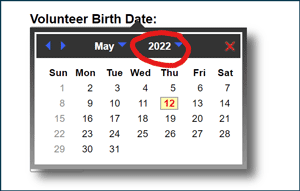
For most Android mobile devices, the date picker should look something like the image below and allows users to select a year by clicking on the displayed year, without having to scroll each month: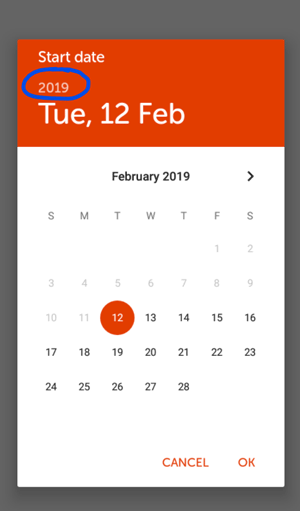
For iOS devices, the date picker will look similar to the image below and allows users to select a year by scrolling the year: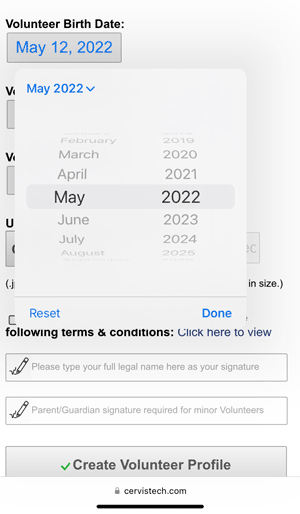
Again, the display of what the date picker looks like and how it functions is really dependent on the browser and OS of the device being used and most users should be familiar with how to use the date picker on the device they are using.Warm Regards,
CERVIS Customer Support
Please sign in to leave a comment.
Comments
1 comment